HyperX Cloud III vs Logitech G PRO X: Wired Tradeoffs
Affiliate disclosure: this article contains Amazon affiliate links. As an Amazon Associate, we earn from qualifying purchases at no extra cost to you. This never affects how we rank products — see how we review.
The Short Answer
Choose the wired HyperX Cloud III if you move between PC and console and want the included 3.5 mm, USB-C and USB-A connection options. Choose the wired Logitech G PRO X if you mainly play on a PC and will actually use its external USB sound card and G HUB for Blue VO!CE microphone filters or DTS Headphone:X 2.0. Logitech states that those advanced features work only on PC through G HUB. A console buyer should not pay extra expecting those settings on the controller connection. HyperX specifications · Logitech product details
This is a comparison of manufacturer documentation, connection paths and buyer requirements. We have not tested these two headsets side by side. Driver size, software labels and microphone filter names do not establish which one sounds better to you or makes your voice clearer in your room.
Our Top Picks
- HyperX Cloud III Wired — Analog, USB-C and USB-A routes for a compatible PC or console.
- Logitech G PRO X Wired — The wired PC option when you will use the USB sound card and G HUB.
Comparison Table
| # | Product | Our Score | Price | Buy |
|---|---|---|---|---|
| 1 | HyperX Cloud III Wired Gaming Headset for PC, PS5, PS4, Xbox Series X | S Best Overall | — | $69.99 | Check Price on Amazon |
| 2 | Logitech G Pro X Wired Gaming Headset With Detachable Boom Mic - Black Runner-Up | — | $99.99 | Check Price on Amazon |
Prices as of November 26, 2026 — check Amazon for the latest price and availability.
At a Glance
| Buying check | HyperX Cloud III, wired | Logitech G PRO X, wired |
|---|---|---|
| Included connection routes | 3.5 mm, USB-C dongle and USB-C to USB-A adapter | Analog cable and external USB sound card for PC |
| Manufacturer-listed driver | 53 mm dynamic | 50 mm PRO-G hybrid mesh |
| Microphone | Detachable noise-cancelling boom; LED mute indicator | Detachable boom; Blue VO!CE filters through G HUB on PC |
| PC spatial-audio feature | HyperX advertises PC audio immersion; verify the software and platform requirements for your setup | DTS Headphone:X 2.0 through G HUB on PC |
| On-headset or cable controls | Earcup volume and mic mute | PC cable volume and mic mute |
| Console buying check | Use a supported connector for the console or controller | Use the analog controller connection; do not expect G HUB features there |
Sources: HyperX Cloud III product and box contents, Logitech G PRO X product page, and Logitech technical specifications. The listed features are manufacturer claims, not performance measurements. Check the exact retailer bundle before purchase.
Start with the Port You Will Use
HyperX lists the Cloud III for PC, PlayStation, Xbox, Switch, Mac and mobile devices. Its box includes the headset's 3.5 mm connection, a USB-C dongle and a USB-C to USB-A adapter. That gives you several ways to connect the same headset, although the correct connector depends on the device. For an Xbox controller, check the 3.5 mm headset socket rather than assuming a USB accessory will work through the console. The mic and audio path should be checked against your particular device and controller. HyperX compatibility and box contents
The wired G PRO X is also more than a USB-only headset. Logitech lists separate PC and mobile cables, a Y splitter and an external USB sound card. Its current store page names Xbox, PS5, PC and Nintendo Switch among compatible devices. The practical split is analog use for a compatible 3.5 mm connection versus the PC software path through the USB card. If you are buying for a console, check the controller jack and the contents of the specific package. Logitech specifications · Logitech compatibility
Neither headset needs a battery or wireless pairing. That is useful if your main concern is a reliable wired connection, but a cable remains attached while you play. If you are still choosing among wired designs, our wired gaming headset guide covers other connection and control choices.
What the PC Software Changes
Logitech's clearest distinguishing feature is Blue VO!CE. G HUB offers real-time microphone filters such as noise reduction, compression and de-essing. Logitech says Blue VO!CE and DTS Headphone:X 2.0 surround work only on PC via G HUB. The USB sound card is part of this PC-focused setup. This is a feature argument, not proof that the microphone will outperform Cloud III in an untreated room. Try a short recording or voice chat using your own game, mic position and noise conditions if voice quality will decide the purchase. Logitech feature conditions
Cloud III takes a different route: HyperX lists a detachable 10 mm microphone with a noise-cancelling design, a mute indicator and physical controls on the earcup. Those controls can be convenient when you change machines because you do not have to find a software panel to adjust volume or mute. HyperX also advertises immersive audio on PC. The product page does not make a measured claim that its spatial presentation beats Logitech's, so treat each software mode as an option to audition rather than a guaranteed competitive advantage. HyperX feature list
If you play mostly on console, the G PRO X's signature PC processing is a weak reason to choose it. If you play mostly on PC and regularly tune your mic for streaming or team chat, the controls in G HUB are a concrete reason to consider it. The Cloud III review and G PRO X review discuss each model separately; this comparison focuses on the decision between their connection and software paths.
Comfort and Sound Need a Fit Check
HyperX lists memory-foam ear cushions and an aluminum frame. Logitech lists a steel-and-aluminum construction and both leatherette and velour earpads for the G PRO X. Those materials tell you what is supplied, but they do not tell you how either clamp will feel after two hours or whether an earpad will suit your glasses. If possible, try them; otherwise, check the retailer's return terms and exact included pads. HyperX materials · Logitech materials
Cloud III's 53 mm driver and G PRO X's 50 mm driver are specifications, not a sound-quality ranking. Game mix, ear seal, output level and personal preference all affect what you hear. If your decision hinges on footsteps, dialogue or bass, compare the headsets on the same source and game at a matched listening level rather than deciding from driver diameter or a virtual-surround label.
A Five-Minute Buying Check
- Name your main device. For a controller with a 3.5 mm jack, compare the analog cable paths first. For a PC, decide whether USB and G HUB are useful to you.
- List the features you will use. Cloud III offers multiple connector types and earcup controls. G PRO X offers Blue VO!CE and DTS processing only in its supported PC software path.
- Check what is in the box. Confirm the exact wired model, cables, USB adapter or sound card, detachable mic and earpads on the retailer's offer. Do not confuse Cloud III with Cloud III Wireless or G PRO X with PRO X 2 Wireless.
- Test fit and voice if you can. Published specifications cannot settle comfort or microphone performance in your room.
- Compare the live offers. Verify selected variant, seller, condition, delivery and current price on Amazon before checkout; these can change after this article is published.
As an Amazon Associate, HeadsetAtlas earns from qualifying purchases. Check the wired HyperX Cloud III offer on Amazon · Check the wired Logitech G PRO X offer on Amazon
Common Questions
Does Blue VO!CE work when G PRO X is plugged into an Xbox controller? Logitech describes Blue VO!CE as a PC feature that runs through G HUB. Do not assume the controller's analog connection provides those filters. Logitech feature conditions
Is Cloud III's USB-C connector the right choice for every console? No. HyperX lists several supported platforms and includes several connection options, but the usable port depends on your console or controller. Check its supported headset connection before ordering. HyperX compatibility
Which headset has the better microphone? The manufacturer pages describe different mic designs and Logitech's optional PC filters. They do not provide a controlled, side-by-side voice comparison. Record your own sample if this is your deciding factor.
HyperX Cloud III Wired
The wired Cloud III provides analog and USB connection options plus a detachable boom microphone. Check the included adapters and the route your console or PC supports. Software features and microphone settings still depend on the source.
Check Price on Amazon · $69.99 as of November 26, 2026 — check Amazon for the latest price.

HyperX Cloud III Wired Gaming Headset for PC, PS5, PS4, Xbox Series X | S
Comfort is King: Comfort’s in the Cloud III’s DNA. Built for gamers who can’t have an uncomfortable headset ruin the flow of their full-combo, disrupt their speedrun, or knocking them out of the zone. Audio Tuned for Your Entertainment: Angled 53mm drivers have been tuned by HyperX audio engineers to provide the optimal listening experience that accents the dynamic sounds of gaming. Upgraded Microphone for Clarity and Accuracy: Captures high-quality audio for clear voice chat and calls. The mic is noise-cancelling and features a built-in mesh filter to omit disruptive sounds and LED mic mute indicator lets you know when you’re muted. Durability, for the Toughest of Battles: The headset is flexible and features an aluminum frame so it’s resilient against travel, accidents, mishaps, and your ‘level-headed’ reactions to losses and defeat screens.
Price as of November 27, 2026 — check Amazon for the latest price.
Logitech G PRO X Wired
This is the wired G PRO X, not the wireless edition. Its external USB sound card and G HUB enable the documented PC software features. Verify the package and connection path before expecting those functions on a console.
Check Price on Amazon · $99.99 as of November 26, 2026 — check Amazon for the latest price.
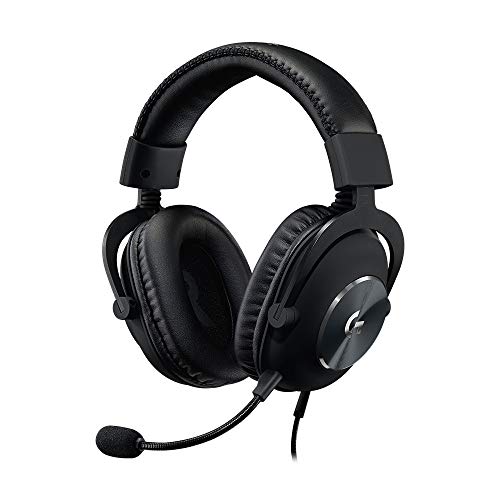
Logitech G Pro X Wired Gaming Headset With Detachable Boom Mic - Black
Headphones for gaming built to last with a durable aluminum fork and steel headband Detachable pro-grade microphone featuring real-time Blue VO!CE technology,* noise reducer, compressor, limiter & more for cleaner, professional-sounding voice comms. *Requires included USB external sound card, Windows PC, and Logitech G HUB software Next-gen 7.1 & object-based surround sound* for greater in-game positional, distance, and object awareness during gameplay with this gaming headset for PC & console. *Requires included USB external sound card, Windows PC, and Logitech G HUB software Soft memory foam earpads for this gaming headset with your choice of premium passive noise-canceling leatherette or soft, breathable velour for supreme comfort Advanced PRO-G 50mm drivers deliver clear and precise sound imaging with improved bass response on this gaming headset. Hear footsteps and environmental cues with clarity to give you the competitive advantage in games
Price as of November 27, 2026 — check Amazon for the latest price.
Verdict
Cloud III is the more straightforward choice for a buyer who switches devices and values the included connector choices and earcup controls. G PRO X makes more sense for a PC-focused buyer who intends to use its USB sound card and G HUB microphone or surround settings. For a console-only setup, judge both as wired analog headsets and compare fit, the exact bundle and the live price before choosing.
Written by
HeadsetAtlas Editorial TeamOur recommendations are research-driven: we analyze technical specifications, aggregate thousands of verified user reviews, and cross-reference expert sources to score every product. Read our full review methodology →